> ## Documentation Index
> Fetch the complete documentation index at: https://docs.zero-x.cloud/llms.txt
> Use this file to discover all available pages before exploring further.
# 5.1 Dashboard
## 3. Application Security
### 3.1 Dashboard
**Step 1 :-** Go to Home
**Step 2 :-** Select Application Security Findings if you have configured your application Datasource.
**Step 3 :-** Once you click on application security, You can jump on Dashboard.
Security Findings > Application Security
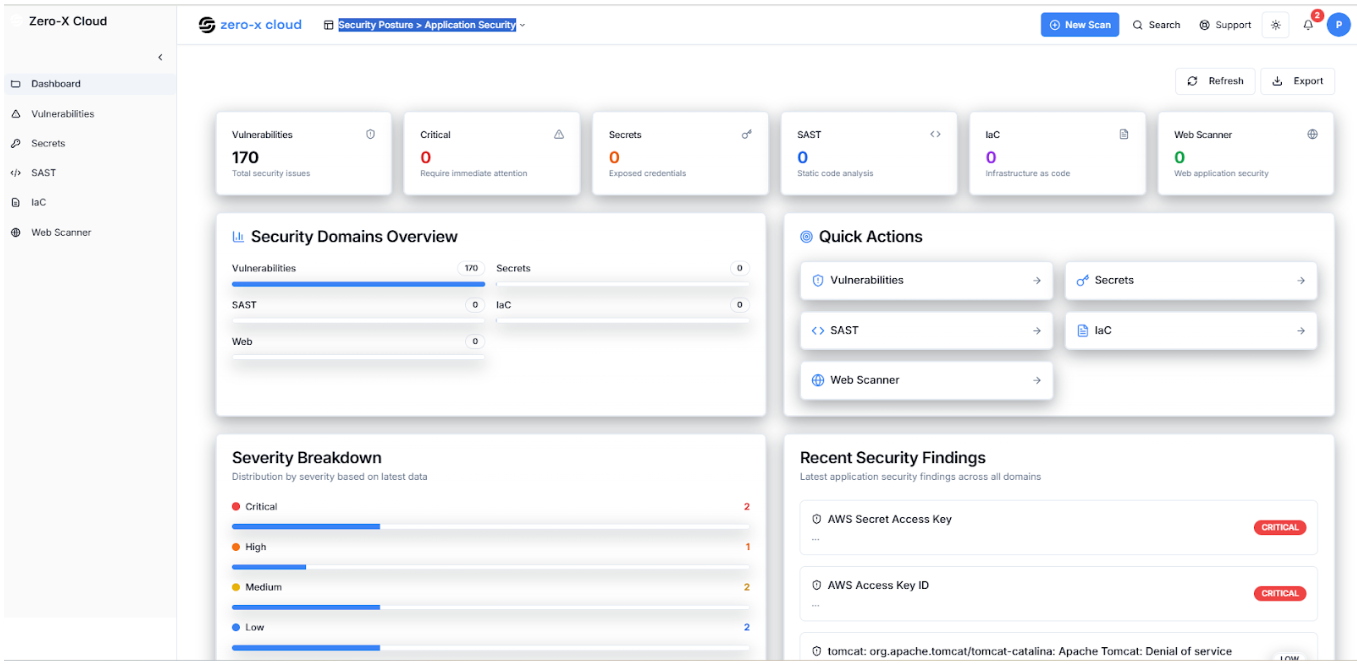 **Step 4 :-** On Application Security Dashboard you can complete picture of your application security. Here with different module
| Category | Description |
| ---------------------------- | ----------------------------------------- |
| Critical Issues | high-risk vulnerabilities found. |
| Secrets Exposure | exposed credentials detected. |
| SAST (Static Analysis) | vulnerabilities in source code. |
| IaC (Infrastructure as Code) | misconfigurations in IaC templates. |
| Web Scanner | web application vulnerabilities detected. |