> ## Documentation Index
> Fetch the complete documentation index at: https://docs.zero-x.cloud/llms.txt
> Use this file to discover all available pages before exploring further.
# 1.1.5 Wazuh
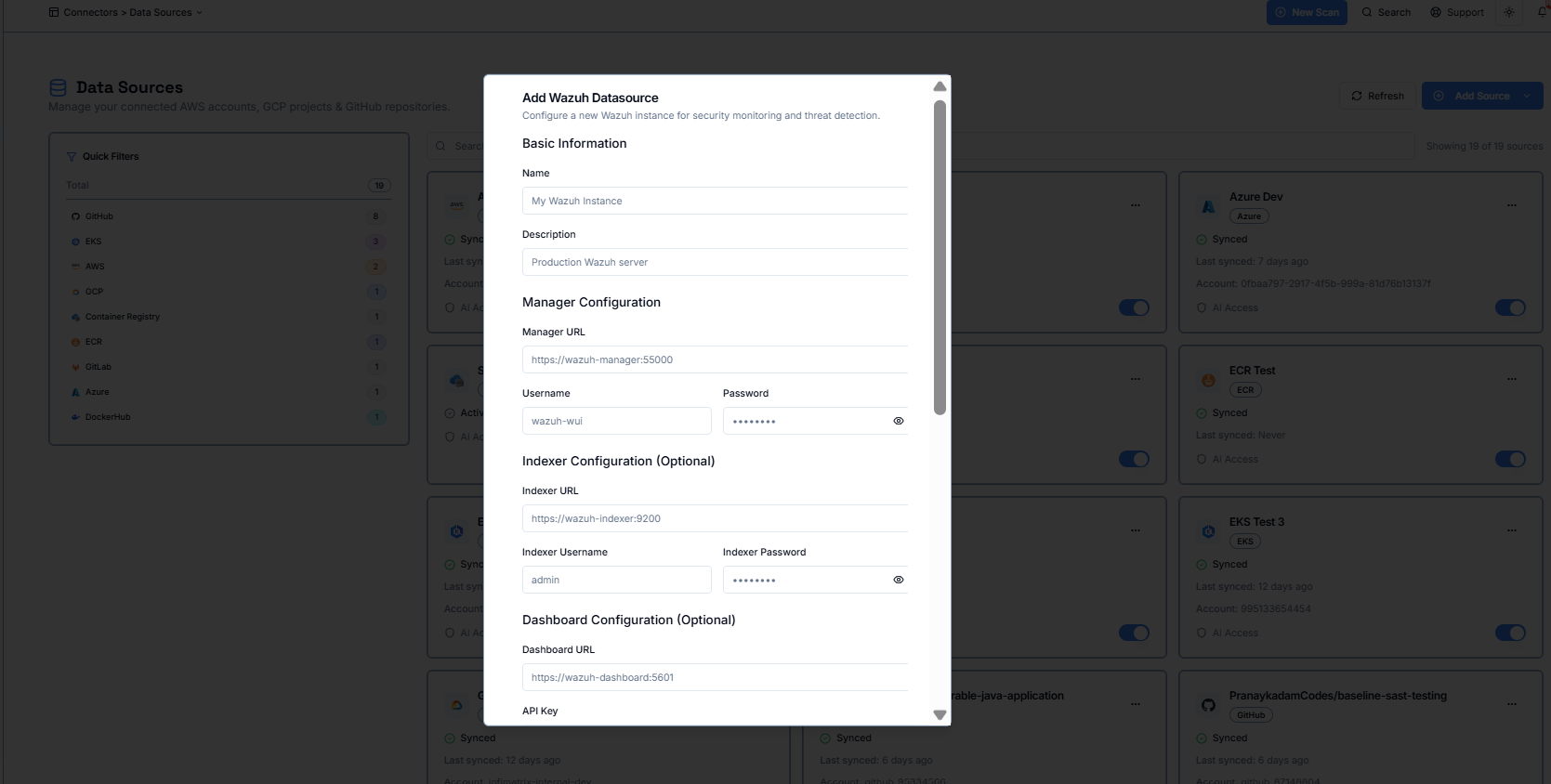 **Step 1 :-** Enter a name and optional description for your Wazuh datasource.
**Step 2 :-** Provide your Wazuh Manager URL, username, and password to allow Zero-X to connect to your Wazuh server.
**Step 3 (Optional) :-** Add Indexer details if you want to sync indexing data, including the Indexer URL and login credentials.
**Step 4 (Optional) :-** Add Dashboard details if you want to integrate Wazuh dashboards by providing the Dashboard URL and API key.
**Step 5 (Optional) :-** Adjust advanced settings such as timeout, retry limits, rate limits, or SSL preferences if your environment requires custom configuration.
**Step 6 :-** Enable the datasource and choose whether to set it as your default Wazuh connection.