Zero-X Cloud Documentation home page
Search...
⌘K
Support
Create Account
Create Account
Search...
Navigation
Getting started
Overview
Onboarding
1. Connectors
1.1 Datasource
1.2 Scans
1.3 Inventory
2. Security Findings
2.1 Security Findings
3. Cloud Security
3.1 Dashboard
3.2 Misconfigurations
3.3 Permissions
3.4 Public Exposure
4. Kubernetes Security
4.1 Dashboard
4.2 Vulnerabilities
4.3 Misconfigurations
4.4 Secret Detection
5. Application Security
5.1 Dashboard
5.2 Vulnerabilities
5.3 Secrets
5.4 SAST
6. Remediation
6.1 Remediation
7. Analytics and Reporting
7.1 Report
8. Finops
8.1 Cost Explorer
9. Compliance
9.1 Dashboard
9.2 Frameworks
10. Settings
10.1 Profile
10.2 Security Settings
10.3 Billing And Subscription
10.4 Team Management
10.5 Audit Log
11.Support Center
Support Center
On this page
5. Compliance:
9. Compliance
9.1 Dashboard
5. Compliance:
Step 1 :-
Go to Home page
Step 2 :-
Select Compliance in that section
5.1. Dashboard
5.2. Framework
5.3. Controls
5.1 Dashboard
Step 3 :-
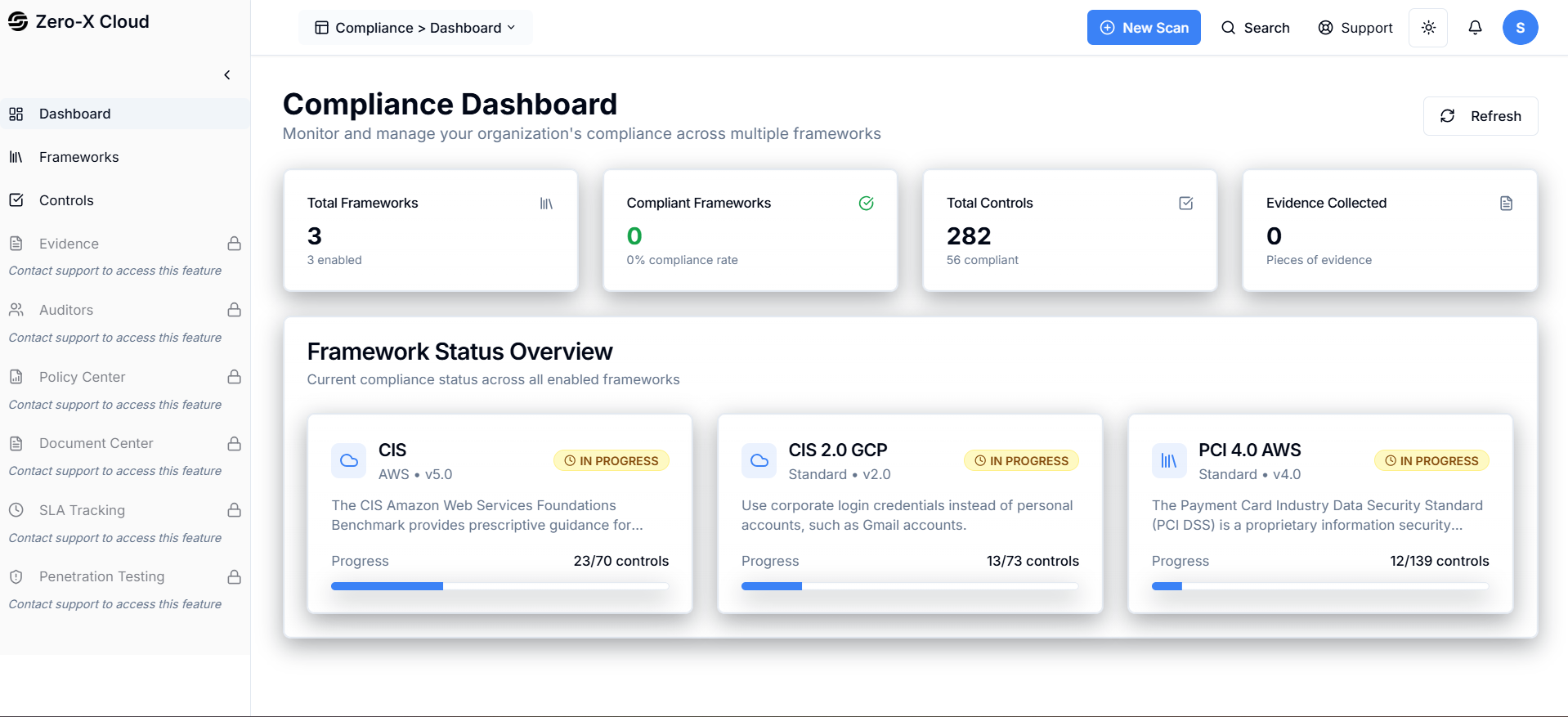
You can See Compliance Dashboard here
8.1 Cost Explorer
9.2 Frameworks
⌘I